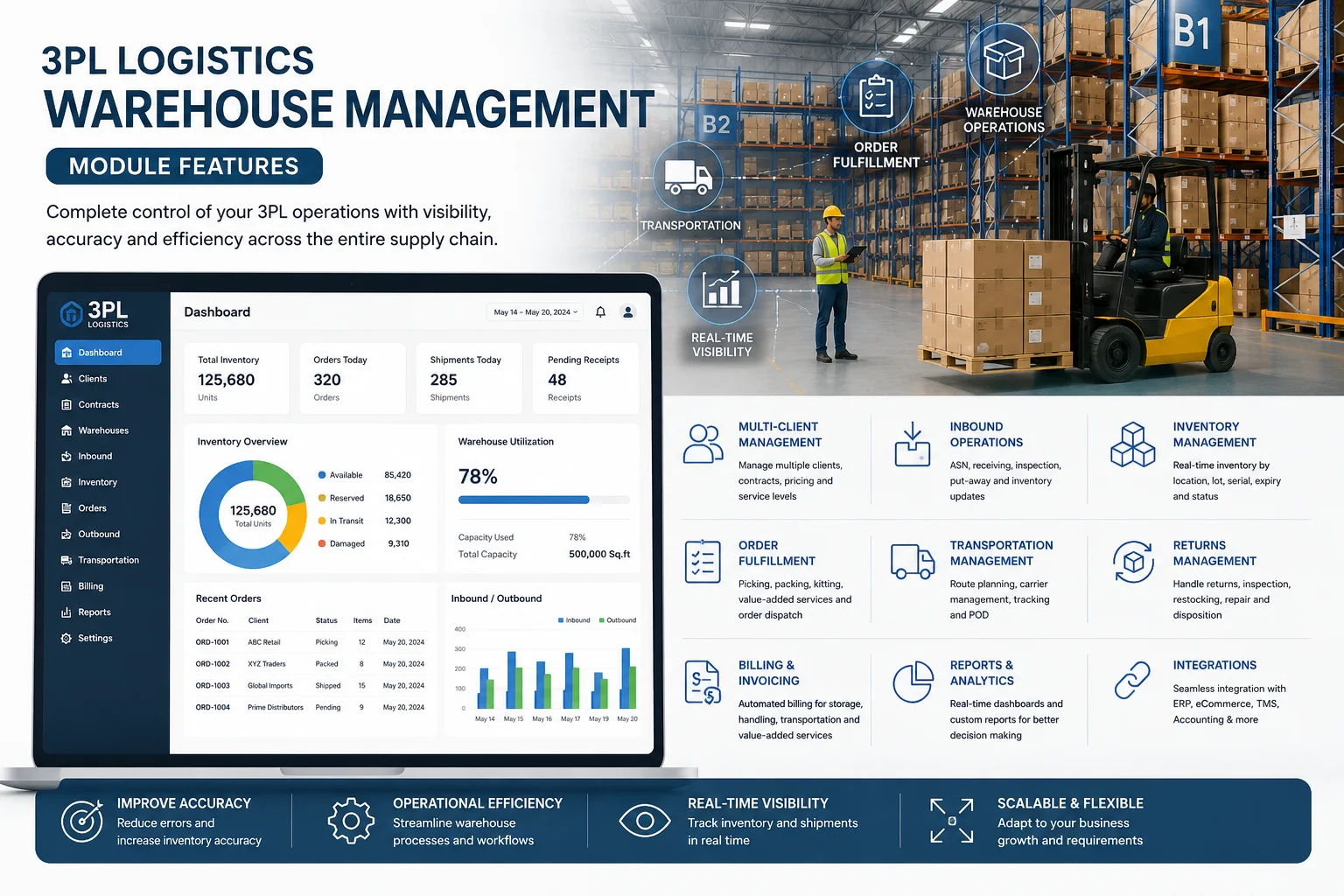
The 3PL module at a glance
Multi-client
Many brands share your warehouses while their stock, orders and billing stay separate.
Inbound & putaway
Scan-driven receiving with suggested storage locations for every unit.
Lots & expiry
Live stock by bin and lot, with shelf-life rules and FEFO picking.
Pick, pack, ship
Route-optimized picking and scan-verified packing for every order.
Pay-per-use billing
Every receive, pick, pack, ship and storage day billed from the client's contract.
Dispatch & tracking
Your own drivers or external carriers, with live tracking and proof of delivery.
Client portal
Clients see their own stock, orders and shipments and can place orders.
Connectors
Orders flow in automatically from Shopify, WooCommerce or any webhook.
How a client's stock moves through your warehouse
- Onboard the client: client record, product catalogue and an active rate contract.
- Receive: an inbound receipt is scanned at the dock and put away into bins.
- Fulfil: orders are allocated, picked, packed and shipped by your driver or a carrier.
- Deliver: tracked to the door and closed with a proof-of-delivery signature.
- Bill: every step was captured as a billing event, so the monthly invoice builds itself.
Clients & warehouse setup
Every record in the module belongs to a client, so several brands can share the same racking without their data or invoices ever mixing.
- Client records with contact details, industry and onboarding date.
- Warehouses laid out as racks and storage locations (bins), plus collection bins for staging picked orders.
- A product catalogue per client: SKU, barcode/UPC, dimensions, weight, unit of measure, and batch/serial tracking where needed.
- A cross-client dashboard for open orders, receipts in progress, expiring stock and revenue.
Inbound receiving & putaway
Stock is checked in against what the client said was coming, and the system decides where it should go.
- Inbound receipts against a PO or ASN, entered line by line or uploaded as a CSV/Excel manifest that is validated before anything is created.
- Dock scanning with a condition for every scan: good, damaged, wrong SKU or shorted. Only good units count, the rest feed the discrepancy report.
- Lot number, manufacturing date and expiry captured at receipt for lot-tracked items.
- Receive by carton: each box becomes a tracked carton that putaway and picking can work with.
- Suggested putaway locations that consolidate with existing stock and respect capacity, with splits across bins when one location is not enough.
- Unique INB reference numbers that are safe to quote to clients and on paperwork.
Inventory, lots & expiry
Know exactly what is stored, where it is and whose it is, down to the bin and lot.
- Live stock per item split by storage location and lot.
- Expiry worked out for each lot from its own manufacturing date and the product's shelf life.
- Expiring stock grouped into 15, 30, 60, 90, 180 and 360-day buckets so the team knows what needs attention first.
- Minimum shelf-life rules that stop lots too close to expiry from being picked or shipped.
Order fulfilment: pick, pack & ship
Orders move through a fixed, scan-verified sequence, so nothing ships that should not.
- Order flow from pending to allocated, picking, packed, shipped and delivered, with on-hold and cancel available along the way.
- All-or-nothing stock allocation: an order is never shown as ready against stock that does not exist.
- Scan-driven, route-optimized picking that always points staff to the next-nearest location.
- Scan-verified packing that records the box used and creates the shipment.
- Serial-number checks at both pick and pack, so a serial that has already shipped can never ship again.
- Auto pick-pack for simple or high-volume orders, using the same validation in a single step.
Stock pulls & returns
Handle the movements that are not customer orders, and bring returned goods back under control.
- Stock pulls for recalls, expiry sweeps and floor reorganisation, selected by lot, item and expiry range, or by hand.
- Guided, nearest-stop-first pull routes with a scan check at every location before stock moves.
- Returns inspected line by line as sellable, damaged, defective or expired.
- Disposition per line: restock, dispose, return to vendor or quarantine, with refund, replacement or credit note recorded.
- No-charge replacement orders issued straight from the return.
Contracts & rates
Each client has its own versioned contract, so past months are always billed at the rates that applied then.
- Storage billed by pallet, cubic foot, bin or square foot, with a choice of prorated or full-pallet charging for part-filled slots.
- Packing fees for the first item and each additional item, kitting billed as hourly labour, and box sizes with their own material cost.
- Delivery billed as carrier cost pass-through, a markup percentage or a flat fee.
- Per-unit receiving and pick rates, and a minimum monthly commitment.
- New contract versions are drafted and activated without overwriting the old ones.
Automatic usage billing
Usage is captured the moment it happens, not reconstructed at month end.
- Billing events recorded at every good receiving scan, verified pick, packed order and shipped consignment.
- A nightly run turns the day's events into itemized usage charges; a monthly run produces the draft invoice.
- Storage charged from what is actually held, recalculated until the period is invoiced.
- Safe to re-run: events are never billed twice and corrections post as offsetting entries.
- Invoices that move from draft to sent, paid or void, with every charge itemized by type.
- Carrier audit flags when the carrier's invoiced weight differs from the system's estimate beyond your threshold.
Dispatch, delivery & tracking
Deliver with your own fleet or hand shipments to carriers, and know where everything is.
- Your own drivers and vehicles, or external carriers, assigned to deliveries and pickups.
- Routes as named delivery zones with a daily capacity per driver.
- Auto-assign that shares work fairly among drivers who still have capacity, and says so plainly when none do.
- Tracking from label created to in transit, out for delivery and delivered, with live driver location where available.
- Proof-of-delivery signature required before an order is marked delivered.
- Cash-on-delivery amounts tracked from what was due to what the driver collected.
Client portal & sales-channel connectors
Give clients self-service visibility and take their orders without re-keying.
- A separate login for each client's users to see their own inventory, orders and shipments.
- Clients can place orders directly from the portal.
- Connectors that pull orders in automatically from Shopify, WooCommerce or any system that can send a webhook.
Common questions
Can several clients share one warehouse?
Yes. Stock, orders and billing are kept per client, so brands can share the same racking without their data or invoices mixing.
How is each client billed?
From their own contract. Receiving, picking, packing, shipping and storage are captured as they happen and rolled into a monthly draft invoice that you review before sending.
Do my clients get their own login?
Yes. Each client's users can log in to the client portal to see their inventory, orders and shipments, and place orders.
Can it be set up around our process?
3PL is fully customisable to each client's process. Talk to us about how your warehouse works.
See 3PL warehousing with your own operations
3PL is fully customisable to each client’s process. Contact us for pricing.